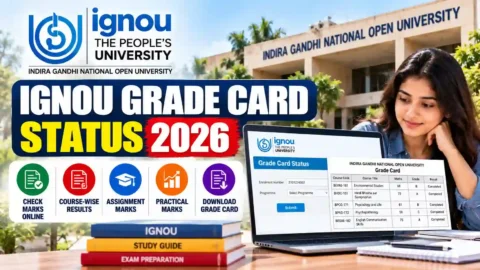
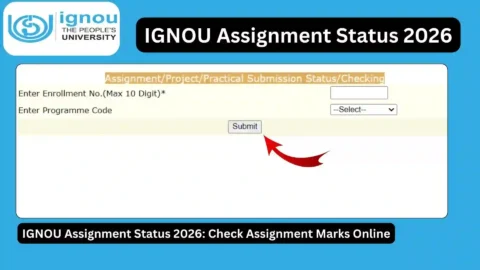
IGNOU Grade Card Status 2026: Indira Gandhi National Open University (IGNOU) provides an online grade card facility that allows students to check their academic performance and examination results. Through the IGNOU Grade Card, students can view their Term-End Examination (TEE) marks, assignment marks, practical marks, project marks and overall course status, depending on their programme.
Students enrolled in undergraduate, postgraduate, diploma and certificate programmes often check their grade card after submitting assignments or appearing in Term-End Examinations. However, many students are unsure how to check their grade card, understand the marks displayed or identify whether their results have been updated.
If you are looking for the IGNOU Grade Card Status 2026, this article explains how to check your grade card online, understand different result statuses, verify assignment and theory marks, and resolve common problems.
Students should use the official IGNOU website and student portal for university-related verification and updates.
IGNOU Grade Card Status 2026 – Overview
The following table provides important information about the IGNOU Grade Card facility.
| Particulars | Details |
|---|---|
| University Name | Indira Gandhi National Open University |
| Common Name | IGNOU |
| Article Topic | IGNOU Grade Card Status 2026 |
| Facility | Online Grade Card |
| Academic Programmes | UG, PG, Diploma and Certificate Courses |
| Details Available | Assignment marks, TEE marks and other applicable components |
| Examination | Term-End Examination |
| Checking Mode | Online |
| Required Information | Enrollment Number and Programme Details, as applicable |
| Official Website | https://www.ignou.ac.in/ |
| Student Portal | https://ignou.samarth.edu.in/index.php/site/login |
| Grade Card Status Link | https://www.ignoubank.com/ignou-grade-card/ |
What Is the IGNOU Grade Card?
The IGNOU Grade Card is an online academic record that displays a student’s performance in different components of their programme. It helps students track their examination marks, assignment marks and other applicable assessment results.
IGNOU follows a credit-based evaluation system for many programmes. Students need to complete the required courses and satisfy the university’s assessment and examination requirements to become eligible for successful programme completion.
The grade card generally contains information such as:
- Programme and course details.
- Course codes.
- Assignment marks.
- Term-End Examination marks.
- Practical examination marks, where applicable.
- Project or dissertation marks, where applicable.
- Course completion status.
- Overall progress in the programme.
The exact information displayed depends on the student’s programme and the assessment requirements for individual courses.
Students should check their grade cards regularly because marks for assignments, theory examinations and practical examinations may be updated at different times.
How to Check IGNOU Grade Card Status 2026 Online?
Students can check their IGNOU grade card online by following a few simple steps.
Step 1: Open the Grade Card Status Page
Visit the following link: https://www.ignoubank.com/ignou-grade-card/
This page provides a convenient way to access the IGNOU grade card checking facility.
Step 2: Visit the Official IGNOU Website
You can also visit the official IGNOU website:
Look for the student support, results or grade card-related section to access the relevant university facility.
Step 3: Open the Grade Card Facility
Select the appropriate grade card link for your programme or examination session, where available.
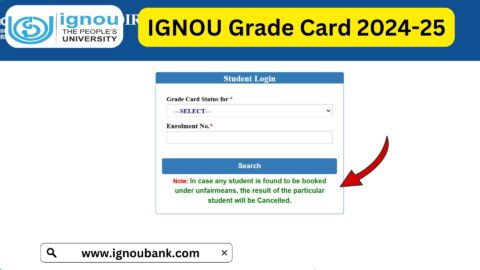
Step 4: Enter Your Enrollment Details
Enter your IGNOU enrollment number and select the programme details if requested.
Make sure your enrollment number is entered correctly. Even a small typing mistake may prevent the system from displaying the correct grade card.
Step 5: Submit the Information
After entering the required details, click the submit or search button.
Step 6: View Your Grade Card
Your grade card should appear if the relevant academic information is available in the system.
Step 7: Check Your Marks and Status
Carefully review your assignment marks, Term-End Examination marks and other applicable assessment details.
Step 8: Download or Save Your Grade Card
If a download or print option is available, save a copy for future reference.
Students should remember that the grade card is an academic record. Always verify important results and course completion details through the university’s official system.
Details Available on the IGNOU Grade Card
The IGNOU Grade Card may display different types of academic information depending on the student’s programme.
1. Assignment Marks
Assignments are an important part of IGNOU’s assessment system. Students are generally required to prepare and submit assignments for applicable courses within the prescribed deadlines.
After the assignments are evaluated and the marks are processed, the results may appear in the grade card.
Students should check the assignment marks for each applicable course code. If marks are missing, they should first confirm whether the assignment has been evaluated and whether the study centre or regional centre has processed the marks.
2. Term-End Examination Marks
Term-End Examinations are conducted by IGNOU according to its academic schedule.
After the examination process and evaluation are completed, the university updates the marks in the relevant academic records.
Students can check their theory examination marks through the grade card facility.
If the marks are not displayed immediately after the result announcement, they may need to check again later.
3. Practical Examination Marks
Some IGNOU programmes include practical examinations or practical components.
Students enrolled in such programmes should check whether their practical marks have been updated in the grade card.
The availability of practical marks depends on the programme structure and the completion of the relevant evaluation process.
4. Project and Dissertation Marks
Certain programmes require students to complete projects, dissertations, fieldwork or other practical assignments.
The corresponding marks may be displayed separately in the grade card, depending on the programme.
Students should verify project submission and evaluation status through the relevant university or regional centre instructions.
5. Course Completion Status
The grade card helps students understand whether they have completed the required assessment components for individual courses.
Students should review all applicable components rather than relying on a single displayed mark.
A course may require successful completion of assignments, theory examinations or practical assessments, depending on its structure.
Understanding IGNOU Grade Card Status
Students sometimes find different status entries in their IGNOU grade cards. Understanding these entries can help them identify whether their results are complete or whether further action is required.
The meaning of a particular entry should always be checked against the programme rules and university instructions.
| Grade Card Entry or Status | General Meaning |
|---|---|
| Completed | The relevant course or assessment requirement is recorded as completed. |
| Not Completed | One or more required components may still be incomplete. |
| Not Available | The relevant result or assessment information is not currently displayed. |
| Assignment Marks Missing | Assignment marks may not yet have been uploaded or processed. |
| Theory Marks Missing | Term-End Examination marks may still be pending. |
| Practical Marks Pending | Practical assessment marks may not yet be updated. |
| Project Marks Pending | Project evaluation or mark processing may still be incomplete. |
These are general explanations, not a guarantee that every IGNOU grade card uses exactly the same wording.
What Does Completed Mean in IGNOU Grade Card?
A completed status generally indicates that the relevant course or assessment requirement has been recorded as successfully completed.
Students should still verify the marks and ensure that all programme requirements have been fulfilled.
What Does Not Completed Mean?
A not completed status may indicate that the student has not yet satisfied one or more required components of a course.
For example, assignment marks, theory examination marks or practical marks may be missing or the student may not have achieved the required passing criteria.
Students should check the course details and applicable programme guidelines before deciding what action is necessary.
Why Is My IGNOU Grade Card Showing Not Available?
A result may not be available if the university has not yet processed or uploaded the relevant information.
This can happen when assignment evaluation, examination checking or data processing is still in progress.
Students should check again after some time and contact the relevant study centre or regional centre if the information remains unavailable.
Why Is My IGNOU Grade Card Not Updated?
One of the most common questions among IGNOU students is why their grade card is not updated even after submitting assignments or appearing in examinations.
There can be several reasons.
1. Assignment Evaluation Is Pending
After submitting assignments, students may need to wait for the study centre or concerned authority to complete the evaluation process.
Until the marks are processed and uploaded, they may not appear in the grade card.
2. Term-End Examination Results Are Pending
IGNOU conducts Term-End Examinations in different sessions. The evaluation and result processing process may take time.
If your theory marks are missing, check whether the university has released and updated the relevant examination result.
3. Practical Marks Have Not Been Uploaded
Students enrolled in programmes with practical components may find that their theory marks are available while practical marks are still missing.
The practical assessment process may be handled separately.
4. Project Evaluation Is Incomplete
Project reports and dissertations may require a separate evaluation process.
If your project marks are not displayed, check the submission and evaluation status with the concerned university office or regional centre.
5. Incorrect Enrollment Number
An incorrect enrollment number can prevent students from viewing their grade cards.
Always enter the correct number as printed on your IGNOU identity card or admission documents.
6. Technical Issues on the Website
Sometimes the grade card website may experience technical problems, slow loading or temporary unavailability.
Students can try accessing the page again after some time or use another browser or device.
What to Do If IGNOU Assignment Marks Are Missing?
If your assignment marks are not displayed in the grade card, follow these steps:
- Confirm that you submitted the assignment for the correct course.
- Check the submission receipt or acknowledgement.
- Verify the submission date and study centre details.
- Contact your study centre to ask whether the assignment has been evaluated.
- If necessary, contact your regional centre with the relevant details.
- Keep your assignment submission proof safe until the marks are updated.
Students should not assume that missing marks automatically mean their assignments have been rejected. First, confirm the evaluation and uploading status.
What to Do If IGNOU Theory Marks Are Missing?
If your Term-End Examination marks are not available, check whether the result for your examination session has been declared.
You can also:
- Verify your enrollment number.
- Check the correct course code.
- Confirm the examination session.
- Revisit the grade card after the result has been processed.
- Contact the relevant IGNOU authority if the marks remain missing.
If you believe there is an error in your result, follow the university’s prescribed procedure for submitting a query or requesting clarification.
Difference Between IGNOU Grade Card and IGNOU Result
Many students use the terms grade card and result interchangeably. However, they serve different purposes.
| IGNOU Grade Card | IGNOU Result |
|---|---|
| Displays academic performance across applicable course components. | Shows examination results for a particular examination session or result update. |
| May include assignment, theory and practical marks. | Generally focuses on examination result information. |
| Helps track course completion. | Helps students check their examination outcome. |
| May be updated as different marks are processed. | May be released through result announcements and updates. |
Students should check both facilities when required to understand their academic progress.
Important Links for IGNOU Students
The following table contains useful links for checking grade cards and accessing other IGNOU student services.
| Service | Important Link |
|---|---|
| Check IGNOU Grade Card Status | https://www.ignoubank.com/ignou-grade-card/ |
| Official IGNOU Website | https://www.ignou.ac.in/ |
| IGNOU Student Portal | https://ignou.samarth.edu.in/index.php/site/login |
| IGNOU Samarth Portal | https://ignou.samarth.edu.in/ |
| IGNOU Assignment Front Page | https://ignoubank.com/ignou-assignment-front-page/ |
| IGNOU Book Status | https://www.ignoubank.com/ignou-book-status/ |
| IGNOU Hall Ticket Portal | https://ignou.samarth.edu.in/ |
Students should use the official university website and relevant portals for final verification of their academic information.
Important Tips for IGNOU Students
Students should follow a few simple practices to avoid confusion while checking their grade cards.
- Keep your enrollment number safe.
- Check the grade card regularly after examination results are announced.
- Verify assignment marks for every applicable course.
- Check theory and practical marks separately.
- Save assignment submission receipts.
- Keep copies of project submission documents.
- Contact the study centre if assignment marks are missing.
- Contact the regional centre or university through the appropriate channel if an issue remains unresolved.
- Do not rely on unofficial screenshots or messages as proof of final results.
- Verify course completion before applying for the next academic step or programme completion.
It is also important to remember that different programmes may have different assessment requirements. Students should always follow the academic rules applicable to their own course.
FAQ about IGNOU Grade Card Status 2026
How can I check my IGNOU Grade Card Status 2026?
You can check your grade card through the following link: https://www.ignoubank.com/ignou-grade-card/. Enter the required details and view the available academic information. You should also verify your result through the official IGNOU system.
What details are required to check the IGNOU grade card?
Students generally need their IGNOU enrollment number and may need to select their programme or other details, depending on the portal.
Can I check IGNOU assignment marks through the grade card?
Yes. Assignment marks for applicable courses may be displayed in the grade card after evaluation and processing by the university.
Why are my IGNOU assignment marks not showing?
Assignment marks may be missing because evaluation or uploading is pending. Contact your study centre or regional centre if the marks are not updated after a reasonable period.
Why is my IGNOU grade card showing incomplete?
An incomplete status may indicate that one or more required assessment components have not been completed or recorded. Check the individual course details to identify the missing component.
How often does IGNOU update the grade card?
There is no single fixed update schedule for every assessment component. Assignment, theory, practical and project marks may be updated at different times after their respective evaluation processes.
Can I download my IGNOU grade card?
If the grade card portal provides a print or download option, you can save a copy for your records. You may also use your browser’s print function if available.
What should I do if my IGNOU theory marks are missing?
Check whether the result for your examination session has been processed. Verify your enrollment number and course code. If the marks remain missing, contact the relevant IGNOU authority.
Is the IGNOU grade card the same as the final marksheet?
No. The grade card is used to display academic performance and assessment details. Students should follow IGNOU’s instructions regarding final marksheets, certificates and programme completion documents.
Can I check my IGNOU grade card using my name?
The grade card facility generally requires the enrollment number and other requested programme details rather than only the student’s name.
What does assignment marks pending mean in IGNOU?
It generally means the assignment marks have not yet appeared in the grade card. Evaluation or uploading may still be in progress.
Conclusion
The IGNOU Grade Card Status 2026 facility is useful for students who want to track their academic performance and check assignment marks, Term-End Examination marks, practical marks and other applicable assessment details.
Students should regularly check their grade cards after submitting assignments and appearing in examinations. If any marks are missing or a course status appears incomplete, they should first identify the pending component and contact the relevant study centre or regional centre when necessary.
To check your grade card status, visit the following page:
Check IGNOU Grade Card Status: https://www.ignoubank.com/ignou-grade-card/
For accurate academic information, always verify your marks and course completion details through the official IGNOU website and university portals. Keep your enrollment details and assignment submission receipts safe so that you can resolve any issues more easily.